
Preschool & Kindergarten Games
RosiMosi LLCEducational
4.210.36K Reviews
- Version
- 15.0.5
- Installs
- 1.00M
- Age Rating
- Everyone
Screenshots

Our Review of Preschool & Kindergarten Games
 Analysis by Appyee
My first impression of Preschool & Kindergarten Games is that it aims to make early learning feel like playtime rather than a lesson. That’s a useful goal for preschoolers, whose attention can shift quickly, but it also sets a standard: the activities need to be easy to start, clear to understand, and varied enough to hold a child’s interest. In my view, this educational game is most helpful as a short, shared activity or a handy option for quiet moments—not as a replacement for conversation, books, or hands-on play.
A playful setting with a clear purpose
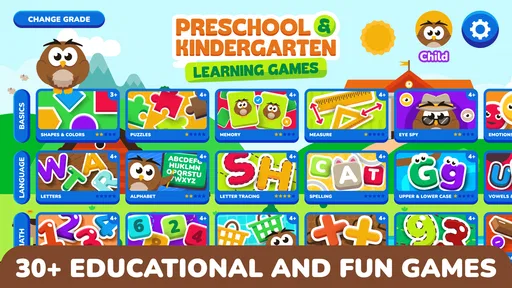
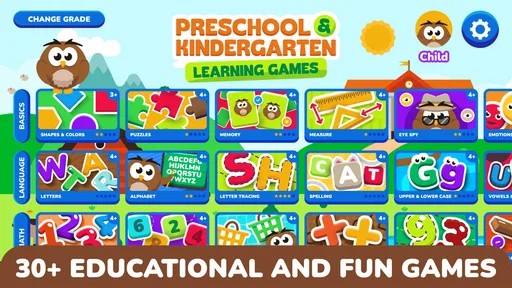
The bright presentation gives the game a child-friendly feel, and its focus on familiar early-learning topics makes it easier for a parent to choose it with a particular goal in mind. RosiMosi LLC has built an experience for preschool, pre-k, and kindergarten learners, with activities around letters, numbers, and math among its core themes. The game has been available since March 23, 2012, and its current version is 15.0.5, a sign of a product that has continued to be maintained over time.
That broad mix is convenient, but it changes how I’d use it. Instead of treating a session as a complete lesson, I’d pick one small aim—recognizing a letter, practicing counting, or trying a simple puzzle—and let the child stop once their attention fades. A ten-minute turn with a clear purpose is usually more useful than stretching screen time just to finish another activity. The game works best when an adult can turn what appears on screen into a little conversation: “What comes after this number?” or “Can you find something nearby that starts with that sound?”
A Colorful World of Learning
First off, the interface is a bright and engaging wonderland. Kids are naturally drawn to colors and animations, and Preschool & Kindergarten Games doesn’t disappoint. The moment you open it, you're met with cheerful graphics and a very intuitive layout. Even if your kiddo isn't tech-savvy yet, they'll find it easy to navigate.
Learning Through Play
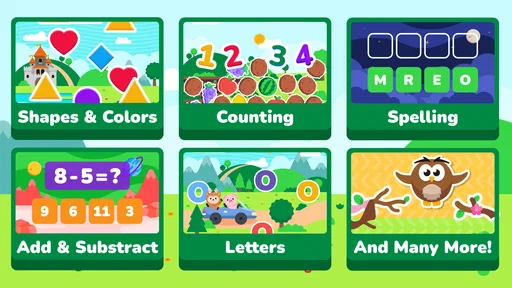
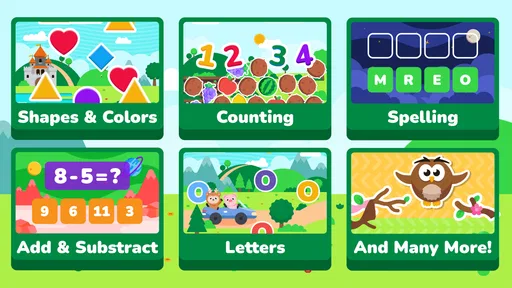
One of the things I really appreciate is how the app blends play with learning. There’s a solid mix of activities that cover essential areas like math, reading, and even basic science. For example, there are counting games with adorable animals helping out, and letter tracing that feels more like a game than a chore. It's all about making learning fun!
The app includes a variety of puzzles and matching games that are not only entertaining but also great for cognitive development. Seeing my niece light up when she solves a puzzle is just priceless. Plus, these games are designed to gradually increase in difficulty, so they keep challenging your little ones as they grow.
How to make short sessions count
A practical way to use a collection of early-learning activities is to let the child lead within a small boundary. I’d offer a choice between a number activity and a letter activity, then stay nearby while they try it. This keeps the interaction child-led without making the device an open-ended distraction. If a child gets stuck, asking them to describe what they see can be more helpful than immediately taking over the screen.
It’s also worth paying attention to whether a child is enjoying the task or simply tapping through it. A correct answer matters less than noticing what they understand and where they hesitate. If tracing feels tiring, switch to a matching activity; if a puzzle is too easy, ask the child to explain how they solved it. These small adjustments make the game more useful as a prompt for learning, even when the app itself is not a substitute for a teacher’s feedback.
Tailored for Little Minds
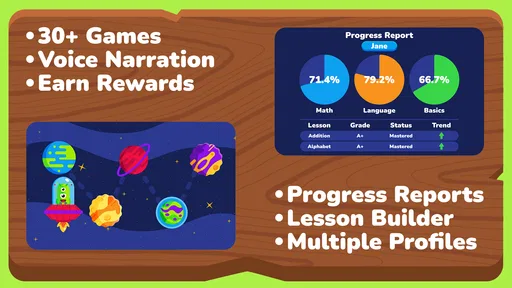
What’s cool is that the app adjusts to your child's pace. If they’re breezing through the alphabet, the app will start introducing them to simple words. It's like having a personal tutor who knows exactly what your child needs. The parental controls are also a nice touch, allowing you to monitor their progress and adjust settings to suit their learning pace.
Interactive and Rewarding
Kids love rewards, and this app has plenty of them. After completing a level, they get adorable stickers and badges which motivate them to keep going. It’s a smart way to encourage kids to stay engaged with their learning without needing much prompting from parents.
Where it fits among preschool apps
Compared with a single-purpose alphabet or counting app, this game’s appeal is its range: a child can move between different kinds of early-learning practice without switching to another product. That makes it a sensible choice for families who want one familiar place to explore several basics. The trade-off is that a broad collection may not provide the same depth as a focused phonics program, a structured reading course, or a dedicated math app. If your child needs repeated practice on one specific skill, a specialist tool—or an activity with a caregiver, such as reading together—may be a better fit.
I’d also avoid judging its educational value by how long a child stays engaged. Stickers and playful tasks can encourage another turn, but they do not tell you whether the child has understood a concept or can use it away from the screen. Treat rewards as a cheerful finish to an activity, then follow up with something tangible: count toys together, look for letters on a sign, or draw a shape on paper. That bridge from screen to everyday life is where a short game session can become more meaningful.
Offline Access
One of the standout features for busy parents is that Preschool & Kindergarten Games can be used offline. So, whether you’re on a long road trip or waiting at a doctor's appointment, your child can keep learning without the need for Wi-Fi. It’s a lifesaver for keeping kids entertained when you need it the most.
A realistic moment for parents
Imagine arriving early for an appointment with a restless preschooler and a few minutes to fill. I’d open the game, help them choose one familiar activity, and sit alongside them rather than hand over the device without a plan. When the wait ends, it is easy to stop at the end of that turn and return to the appointment. The same approach can work on a journey, though I’d check that the game is ready to use before leaving home rather than discovering a setup hurdle when the connection is unavailable.
For a child who enjoys switching between letters, numbers, and puzzles, that flexibility can make it a useful travel companion. For a child who becomes upset when screen time ends, the game may be less convenient in a waiting room; a book, coloring materials, or a simple verbal game can be easier to put away. The best choice depends not only on what the app offers, but also on how your child handles transitions.
Cost, age, and family fit
The game is free to download, with optional in-app purchases priced from $4.99 to $39.99 per item. I’d look at the available purchase choices with a parent before letting a child explore independently, and decide in advance whether any paid content is worth it for your household. The free starting point makes it easy to try the general approach, while the range of optional purchases means families should keep an eye on what is offered inside the app.
It is rated Everyone, and its intended audience is young learners, but age labels do not tell you whether a particular child will be ready to navigate activities alone. A preschooler may still need help understanding instructions, choosing a task, or putting the device down. I would treat this as a family learning aid: useful for practicing simple concepts, with an adult close enough to guide the session and notice when the child needs a break.
Sound, pacing, and the limits of screen learning
The cheerful visual style supports a light, playful mood, while the most important pacing decision often belongs to the adult: whether to continue, change activities, or stop. A varied game can make it tempting to keep moving from one task to another, so I’d set a simple endpoint before starting. That might mean one activity, a short wait, or stopping when the child begins to lose interest. This keeps the game from turning a spare moment into a longer session by accident.
I would not choose it as the only resource for learning to read or count. Digital activities can offer repetition and immediate interaction, but they cannot replace hearing a story read aloud, handling objects, drawing, or getting personal feedback from an adult or teacher. If a child needs a carefully sequenced curriculum, a teacher-directed resource may be more appropriate. If the goal is light practice across several early skills, this broader game has a more practical role.
Safety and supervision
Safety is a huge concern these days, and thankfully, this app is a safe haven for kids. There are no ads, so you don’t have to worry about inappropriate content popping up. It’s designed to keep your child focused on learning without interruptions, and that’s a big win in my book.
Even with an ad-free experience, I’d still set it up and explore it with the child first. That gives you a chance to see how the activities are presented, decide which ones suit their current abilities, and establish a routine for ending a session. For younger children especially, supervision is about more than online distractions; it is also how you turn tapping and matching into a chance to talk, explain, and learn together.
Who will enjoy it—and who may prefer something else
I’d recommend it to families looking for a flexible way to introduce or revisit early concepts, especially when a child likes colorful activities and benefits from changing tasks. Its 4.3 average from around 28,000 ratings, alongside more than 1 million installs, suggests that many families have tried it, though those numbers cannot tell you whether its style will suit your child. It is also a reasonable option for caregivers who want a ready activity for short breaks, rather than a formal lesson plan.
I’d skip it if you want a quiet, book-centered experience, a tightly structured course, or one that concentrates deeply on a single skill. It may also be a poor match for a child who finds bright, interactive screens overstimulating or who struggles with stopping once play begins. In those cases, a physical puzzle, picture book, or adult-led activity gives you more control over pace and distraction.
With 10,000 reviews and an Everyone age rating, the game has a sizable audience, but the right test is still a brief, supervised tryout with your own child. Notice whether they can understand the activity, whether they want to explore without becoming frustrated, and whether they can leave it calmly. Those observations are more useful for deciding on a fit than popularity alone.
A cheerful helper, not a whole classroom
In conclusion, Preschool & Kindergarten Games is a fantastic tool for early education. It's engaging, educational, and offers a wide range of activities that cater to different learning styles. It's perfect for parents who want to give their kids a head start in a fun and interactive way. So, if you're on the lookout for an app that combines learning with play, this might just be the perfect fit.
My recommendation is a little more measured: I’d use it as one small part of a child’s learning routine, with an adult helping connect screen activities to the real world. Its range and playful presentation are appealing, while optional purchases, the pull of rewards, and the limits of screen-based practice deserve a parent’s attention. If your child responds well to short, colorful activities, it is worth trying; if you need a structured teaching tool or screen-free calm, another approach will serve you better.
Verdict
Strengths of Preschool & Kindergarten Games
- Engaging and colorful graphics.
- Wide variety of educational activities.
- Easy-to-navigate interface.
- Encourages independent learning.
- No in-app advertisements.
Limitations of Preschool & Kindergarten Games
- Limited free content available.
- Some activities may need supervision.
- Requires internet for updates.
- Occasional performance glitches.
- Audio can be repetitive.
Other Releases by RosiMosi LLC
View All
Barnyard Games For Kids
Educational4.1

Second Grade Learning Games
Educational4.1

Third Grade Learning Games
Educational3.9

First Grade Learning Games
Educational4.1
Similar Picks in This Category
View All
Little Panda Policeman
BabyBus4.0

Monster Trucks Game for Kids 2
Raz Games4.1

Little Panda's Chinese Recipes
BabyBus4.4

Little Panda's Restaurant
BabyBus4.4

Little Panda's Ice Cream Games
BabyBus4.3

Baby Panda Care
BabyBus3.8
Frequently Asked Questions
What types of educational activities are included in Preschool & Kindergarten Games?
Preschool & Kindergarten Games offers a wide range of educational activities designed to enhance children's learning experiences. These include alphabet and number recognition, basic math skills, color and shape identification, and problem-solving exercises. The games are interactive and engaging, making learning fun and effective for young children.
Is Preschool & Kindergarten Games suitable for all preschool-aged children?
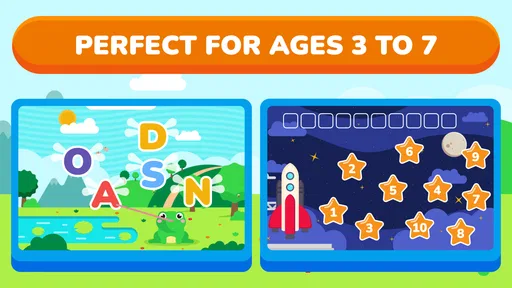
Yes, Preschool & Kindergarten Games is designed to cater to children ages 2 to 5. The app offers different levels of difficulty to accommodate various learning stages. It is tailored to help children develop foundational skills at their own pace, ensuring a supportive and adaptive learning environment.
Does the app require an internet connection to function?
Preschool & Kindergarten Games can be used offline once it is downloaded, making it convenient for parents and children on the go. However, some features, such as updates and additional content downloads, may require an internet connection. This offline capability ensures uninterrupted learning anywhere.
Are there any in-app purchases or advertisements in Preschool & Kindergarten Games?
The app offers a free version with limited features and the option for in-app purchases to unlock additional content. While the free version includes ads, purchasing the full version removes these advertisements, providing an ad-free experience that allows children to focus solely on learning activities.
How can parents track their child’s progress in the app?
Preschool & Kindergarten Games includes a parent dashboard that allows parents to monitor their child’s progress. This feature provides insights into the skills their child is developing, areas where they excel, and topics that may require additional attention, helping parents guide their child’s educational journey effectively.
Play our best games!


